INITIALIZING

Select an App

Choose an experimental application from the sidebar to inspect its details, features, and launch it.

Navigate Enter Select
GlobePoint Preview
Interactive Widget WebGL Vanilla JS

GlobePoint

Interactive 3D & 2D Company Presence Globe

GlobePoint is a powerful embeddable widget that allows companies to showcase their worldwide presence using a stunning interactive 3D globe or 2D map. Configure offices, data centers, warehouses, and partners visually, then embed the result on any website using a single HTML snippet.

What Makes GlobePoint Different

GlobePoint is configuration-driven and completely self-contained. No accounts, no APIs, no database, and no runtime dependencies. Your entire setup is encoded directly into the embed snippet. Build visually, export once, deploy anywhere.

Core Features

3D Globe Engine

  • Photorealistic earth textures
  • Day/night lighting with city lights
  • Animated orbit rings & atmosphere glow
  • Smooth drag, rotate & zoom
  • Auto-rotation with adjustable speed

2D Map Mode

  • Instant 3D/2D switching
  • Fast pan & zoom interactions
  • Custom land & border colors
  • Subdivision support (states & provinces)
  • Constrained world bounds

Points of Interest

  • Custom categories & colors
  • Country search auto-coordinates
  • Online/offline status indicators
  • Clickable detail panels
  • Smooth camera fly-to animation

Connection Arcs

  • Animated globe-curved arcs
  • Visualize networks & routes
  • Custom colors per connection
  • Works in both 3D & 2D modes
  • Automatic cleanup on deletion

Theming & Branding

  • Primary & secondary color system
  • Company logo & name display
  • Blur, transparent or solid panels
  • Custom card text colors
  • Theme-aware loading screen

Embed System

  • Single HTML snippet
  • Base64 encoded configuration
  • No backend required
  • Works with WordPress, Webflow, Wix
  • HTTPS-safe & iframe isolated

Ideal Use Cases

  • Company global presence pages
  • Infrastructure & data center visualization
  • Partner & logistics networks
  • Enterprise landing pages
  • Tech & SaaS marketing sites

Platform

  • Desktop & Tablet — Optimized for WebGL-capable browsers
  • Builder — Visual configuration interface
  • Viewer — Public embed preview
Fluxion Preview
Visual Flow Designer TypeScript Canvas2D

Fluxion

Visual API, State Machine & Database Flow Designer

Fluxion is a browser-based visual flow designer for building, executing, and exporting API pipelines, state machines and databases using an interactive node-based canvas. Design logic visually, run it live, inspect every data mutation, then export real, production-ready code.

What Makes Fluxion Different

Fluxion doesn't just draw diagrams — it executes them. Every node runs live, every transition is traceable, and every visual flow can be exported as real code or re-imported later.

Three Powerful Modules

API Flow Builder

  • Design complete API request pipelines
  • Validation, auth, transforms, DB & external APIs
  • Conditional branching & error handling
  • Live execution with animated data packets
  • Per-node input/output diff inspection

State Machine Designer

  • Visual finite state machines
  • States, transitions, guards & actions
  • Event-driven execution model
  • Supports cycles & parallel regions
  • Live step-by-step state traversal

Database Designer

  • Design schemas, compose queries, build CRUD pipelines
  • Export real SQL or Prisma code
  • Sequential pipeline walker execution
  • Schema Validation
  • Supports SQL & NoSQL

Execution & Debugging

  • Live, Step, Slow-Motion & Replay modes
  • Pause & resume execution at any point
  • Execution summary & detailed log viewer
  • Hover connections to inspect runtime data
  • Immutable snapshots at every node

Export & Interoperability

  • API: Express.js, Fluxion JSON, Pseudocode
  • State Machines: XState v5, TypeScript, Mermaid
  • OpenAPI / Swagger import support
  • Portable JSON for round-trip editing

Ideal Use Cases

  • API design & debugging
  • Backend logic prototyping
  • Stateful system modeling
  • Database design & debugging
  • Architecture documentation
  • Teaching & technical demos
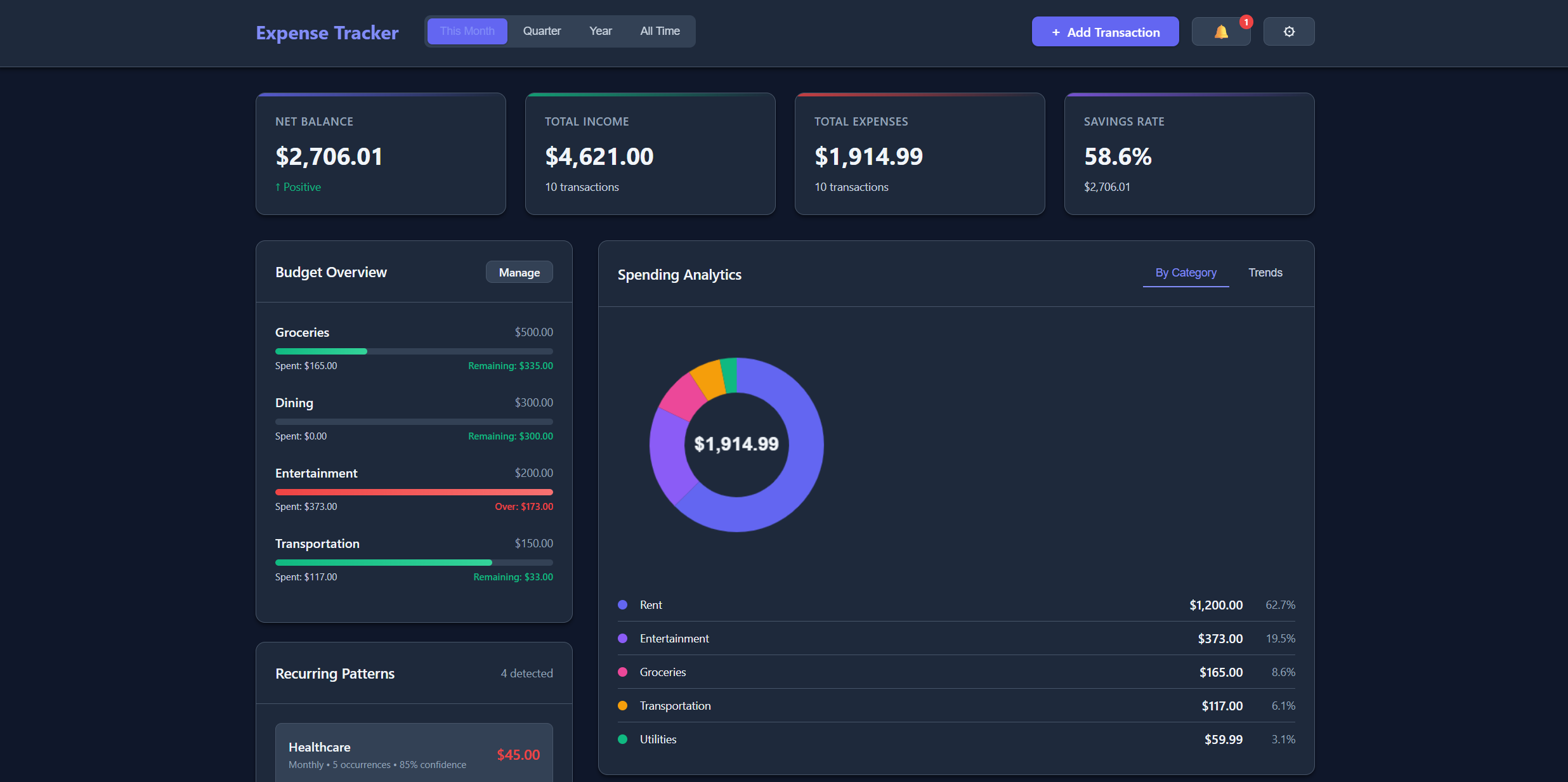
Expense Tracker Preview
Finance Tool PWA Vanilla JS

Expense Tracker

Your Complete Personal Finance Command Center

Expense Tracker Pro is a comprehensive financial intelligence platform. Track every transaction, manage budgets with precision, analyze spending patterns, detect recurring expenses automatically, forecast your financial future, and achieve your savings goals — all while maintaining complete privacy with local-first data storage.

What Makes It Different

Built entirely with vanilla JavaScript (no frameworks!). Your data never leaves your device. No servers, no accounts, no tracking. Complete privacy guaranteed. Fully free.

Core Features

Transaction Management

  • Full CRUD operations
  • Smart categorization (12+ categories)
  • Advanced filtering & search
  • Receipt attachments
  • Multi-currency (9 currencies)

Budget Management

  • Category-based budgets
  • Real-time tracking
  • Smart alerts at 80%, 90%, 100%
  • Monthly, quarterly, yearly periods
  • Visual progress bars

Analytics & Insights

  • Category breakdown (donut charts)
  • Spending trends (line charts)
  • AI-powered insights
  • Top categories analysis
  • Savings rate tracking

Cash Flow Forecast

  • 90-day projection
  • Trend analysis with linear regression
  • Recurring integration
  • Balance alerts
  • Interactive forecast chart

Recurring Detection

  • Auto-detect recurring transactions
  • Multiple frequencies
  • Confidence scoring
  • Overdue alerts
  • Historical tracking

Progressive Web App

  • Install on any device
  • Works offline
  • Fast loading (cached resources)
  • App-like experience
  • Auto updates

Platform

  • All Devices — Fully responsive, works everywhere
  • PWA — Install for app-like experience
  • Offline — Works without internet
Stellar Anomaly Preview
Space Shooter HTML5 Canvas Custom Physics

Stellar Anomaly

Deep Space Survival Shooter with Campaign Progression

Stellar Anomaly is a deep space survival shooter featuring mission-based campaign progression, diverse biome environments, epic boss battles, persistent progression systems, and endless replayability. Navigate through 7 unique biomes, battle sector bosses, unlock new ships and upgrades.

Campaign Structure

Galaxy Map

  • 18+ sectors across 7 biomes
  • Story-driven missions
  • Progressive difficulty (level 1–10)
  • Star rating system (1–3 stars)
  • Unlock new sectors as you progress

7 Biome Environments

  • Space — Asteroid fields, defense stations
  • Desert — Sandstorms, heat distortion
  • Ice — Blizzards, freeze mechanics
  • Volcanic — Lava fields, eruptions
  • Toxic, Terran, Anomaly & more

Boss Encounters

  • 12+ unique bosses
  • Multi-phase transitions
  • Unique projectile patterns
  • Dynamic boss music
  • Final Boss: Helios Sigma (5 phases)

Progression Systems

  • 5 playable ships with distinct stats
  • 20+ stackable permanent upgrades
  • Currency system with 7 biome materials
  • 30+ achievements to unlock
  • Codex system with lore entries
  • 5 weapon systems with tier upgrades
  • 7 endless mode variants

Content Summary

18+ Sectors
7 Biomes
30+ Missions
12+ Bosses
5 Ships
30+ Achievements
3D Solar System Preview
3D Simulation Babylon.js WebGL

3D Solar System

Navigable Physics-Enhanced Space Simulation

3D Solar System is a fully navigable, physics-enhanced simulation built to immerse users in the depths of space. Command a flying saucer and explore SOL with real-time lens flares, planetary interactions, solar events, asteroid belts, and more.

Key Features

Interactive 3D World

  • Control your saucer through dynamic 3D space
  • Planets, moons, and realistic orbits
  • Asteroid & Kuiper belts
  • Voyager probe with blinking lights
  • Collision detection enabled

Dynamic Events

  • Real-time solar flares
  • Comet flybys
  • Animated satellites
  • Twinkling starfield + glow FX
  • Simulation speed control

UI & Discovery

  • Planetary intel popups (mass, gravity, atmosphere)
  • Sidebar discovery feed
  • Orbit path visualization
  • Screenshot tool
  • Cockpit-style control deck

Platform

  • Desktop Only — Too powerful for mobile
  • Browser-Based — No downloads required
Project Roadmap Preview
Project Management Drag & Drop Vanilla JS

Project Roadmap

Mission Control for Serious Operators

Project Roadmap Tracker isn't your average Kanban board — it's a mission control interface. Inspired by RSI SC's Roadmap, visually map out milestones, stack tasks by category, and execute using a drag-and-drop command center designed to keep chaos contained and progress precise.

Key Features

  • Stage Columns: Define custom phases — from TENTATIVE to COMMITTED — with surgical accuracy
  • Task Hierarchy: Group and manage deliverables under structured categories
  • Drag-and-Drop: Reorganize missions in real time
  • Status Visualization: Tactical color-coded markers at a glance
  • Appearance Customization: Recolor, reshape, and realign the interface
  • Save & Load Protocol: Local storage now. Server-grade coming soon

Platform

  • Desktop — Optimized for precise interaction
Cursed Form Preview
Hostile UX Vanilla JS

The Cursed Form

This Form Does Not Want To Be Filled

The Cursed Form is an evil, malevolent contact form engineered to psychologically break users. It actively resists submission — shaking violently, flipping upside-down, hijacking cursors, and mocking every attempt to communicate.

Chaos Features

  • Hostile UI System: Containers shake, labels become sarcastic, inputs slide out of reach
  • Progressive Evil Engine: 12 unique psychological stages of escalating madness
  • Form Spirit AI: A sarcastic spirit mocks you in real-time
  • Cursor Flee Detection: The form literally flees from your mouse
  • Konami Code Easter Egg: Give the form PTSD with a cheat code
  • Final Boss Submission: Survive all 12 stages to "submit"

Platform

  • Desktop Only — Mobile users would drop their phones in fear
Dev Sanity Simulator Preview
Parody Diagnostic Vanilla JS

Developer Sanity Simulator

A Sarcastic Mental Health Check for Coders

Developer Sanity Simulator is a parody diagnostic tool that roasts your coding habits, questions your career choices, and prescribes "good enough" pills. Warning: may trigger existential recursion.

Features

  • Psychological Debugging: Answer brutally honest questions — brace for judgment
  • Real-Time Roasts: Every answer triggers an on-screen quip
  • Matrix-Style Vibes: Glowing green code rain ambiance
  • Trait Analysis Engine: Maps your chaos, laziness, perfectionism
  • Diagnosis & Prescription: A hilariously unhelpful treatment plan
  • Konami Code Easter Egg: Because even therapy needs cheat codes

Platform

  • All Devices — Works in your browser. Runs in your heart.